
AppMySite Review (2025): The Easiest Way to Build an App Without Code?
Table of Contents
Intro
Why I Tried AppMySite?
First Impressions
What I Like So Far
What I Wish It Had
For Who
Conclusion
Intro + TL;DR
If you’ve ever thought “I have an idea for an app, but I don’t want to hire a developer or mess with code”, you’re not alone.
That’s exactly where I was when I found AppMySite.
I had a simple concept in mind: a premium experience for my airbnb listing. But I didn’t want to spend weeks learning a no-code platform or pay thousands to launch something basic.
AppMySite lets you create and launch simple mobile apps incredibly fast, even if you’ve never built one before.
I’ve been testing their pay-per-app plan. It’s not perfect, but it might be one of the most beginner-friendly ways to bring an app idea to life.
Here’s my honest AppMySite review after building my first prototype.
TL;DR Verdict
✅ Pros
-
Very easy to use, even without coding experience
-
Affordable pay-per-app pricing model
-
Great for solopreneurs testing simple ideas
-
Fast to get started and launch
-
Ideal for lead generation apps, quizzes, or simple tools
❌ Cons
-
No free trial to test before paying
-
Limited design flexibility
-
Not suitable for complex or feature-heavy apps
-
Customization options are fairly basic
-
Not ideal for perfectionists or pixel-level designers
Why I Tried AppMySite?
I’ve had this idea floating around for a while. A simple premium experience for my guests and soon-to-be guests in my luxury getaway airbnb summer house.
But there was one big issue: I’m not a developer.
I didn’t want to spend weeks trying to learn a complicated no-code platform. And I definitely wasn’t ready to hire a dev team for a small test project. I just needed something that worked, looked decent, and helped me validate the idea fast.
I came across AppMySite.
It claimed to turn any website or app idea into a real mobile app. No code. No tech headaches. No bloated monthly pricing plans.
It sounded almost too good to be true, so I gave it a try using their pay-per-app model.
The goal was simple: launch a basic app and see if I could actually collect leads and test the idea without wasting time or money.
First Impressions and Getting Started
Well…
Signing up for AppMySite was refreshingly simple.
No long setup wizards, no confusing onboarding flows, and no pressure to commit to a big monthly plan. You can just pick the pay-per-app option and start building right away.
Actually I didn’t even put my credit card down to start playing around so that’s nice.
The interface is clean and intuitive. Everything is drag-and-drop or click-to-edit. Even if you’ve never built an app before, it feels approachable. You choose your layout elements, colors, icons, and features from a side menu, and you can preview the results instantly on a mobile screen emulator.
One thing I liked right away was that it didn’t try to overwhelm me with too many options. Some no-code platforms throw everything at you — conditionals, databases, triggers, and APIs — and expect you to figure it all out.
AppMySite focuses on helping you build something usable fast.
I started building my app and within a couple of hours I had something…. a working draft that looked clean and was functional enough to test with real users.
Would I call it perfect?
No. But I didn’t feel lost or stuck either.
And that’s a big win for anyone trying to move quickly.
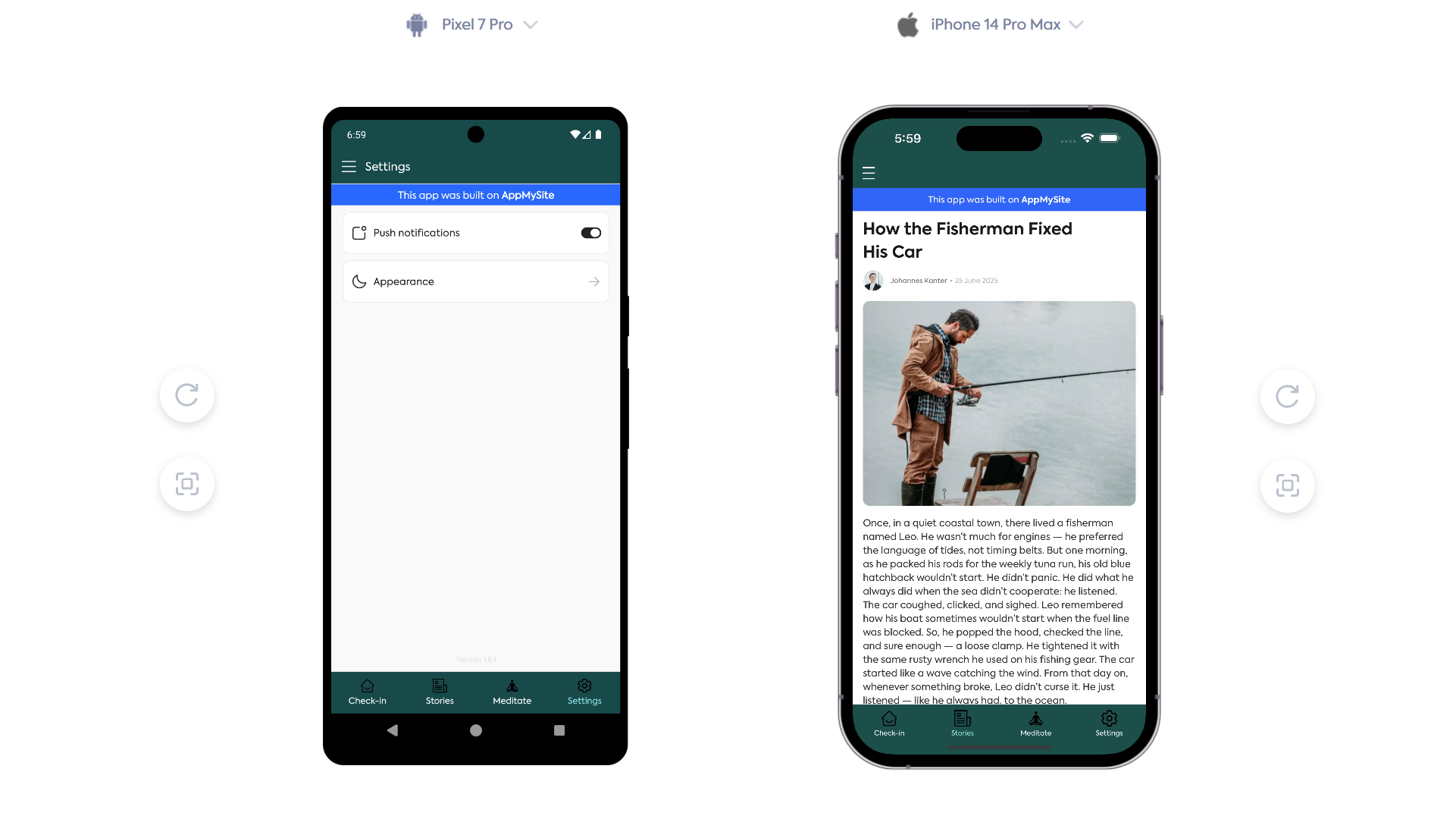
Meet the app: Trihouse
A simple informative app for my guests with a cool meditation section and section of local stories.
What I Like So Far
What really stood out to me with AppMySite is how quickly you can go from idea to something real. You don’t need a design background, you don’t need to understand app stores, and you definitely don’t need to write code.
It’s the definition of plug-and-play.
After testing it with a few ideas, I decided to try something practical and a bit more personal.
I built an app for my Airbnb listing, Trihouse, which is a cozy A-frame cabin I rent out.
The goal was simple: create an interesting guest experience.
Instead of sending scattered check-in messages or printed instructions, I wanted a provide a little bit more where guests could:
-
-
Find check-in info
-
Read how-to guides for things like the fireplace or sauna
-
Get recommendations for nearby activities, trails, and hidden gems
-
Listen to a curated playlist to set the mood and meditate
-
Even book little extras like early check-in or firewood bundles
-
I already had some of this in a Google Docs, so I used AppMySite to turn that into a mobile app.
The process? Surprisingly smooth.
I uploaded the logo, picked colors that matched the Trihouse vibe, and embedded a few tools Google Maps and custom checkout for extra services.
Within a couple of hours, I had a fully functional guest companion app.
No complex settings. No “developer mode.” Just a few clicks, a few drag-and-drop sections, and it felt like something I could hand off to guests with pride.
So far, I love how beginner-friendly it is. You don’t need to overthink anything.
Exactly what I was looking for.
What I Wish It Had
While AppMySite does a great job making app creation fast and beginner-friendly, there are still a few areas that feel limiting — especially once you get past the basics and want more control.
The biggest drawback for me isn’t the lack of a free trial.
In fact, you can do quite a bit with the limited version before committing to a paid plan.
But the absence of a true free version means you can’t actually launch anything unless you’re ready to pay. For hobby projects, experiments, or testing market fit, that can be a small hurdle.
Another pain point I ran into was the limited flexibility in layout and functionality.
The drag-and-drop system works well for setting up a basic structure, but I found myself wishing for more interactive components. For example, it would be amazing to natively add things like forms, or simple quizzes without having to embed them from outside tools.
It’s not a dealbreaker, but it does mean AppMySite is best suited for straightforward, content-driven apps rather than highly interactive ones.
Unless you’re more techie and okay to mess around with code.

Who It’s Great For (And Who Should Skip It)
AppMySite is a solid pick if you’re a solopreneur, small business owner, or creator with a clear idea and no time to waste.
If your goal is to launch a simple app that delivers content, guides users, or extends an existing website, this platform makes it easy to ship fast.
It works especially well for:
-
-
Airbnb hosts or property owners who want a custom guest app
-
Local businesses that want a digital brochure or client hub
-
Content creators looking to turn their blog or brand into an app
-
Anyone who wants to validate an idea before investing in a full build
-
In my case, it was perfect for turning my cabin rental into a more premium experience. I didn’t need deep functionality, I just needed something that looked good, worked on phones, and could act as a digital companion for my guests.
AppMySite delivered that.
But it’s not for everyone.
If you’re someone who loves tweaking every design detail, or you need advanced functionality like native forms, databases, or in-app purchases, you’ll probably feel limited pretty quickly.
Developers and designers who care about pixel-perfect control or technical integrations will find this tool too simple for their needs.
AppMySite is built for speed and simplicity, not precision or power. And that’s what makes it useful as long as you’re building within that lane.
Pricing Breakdown

AppMySite offers three main pricing options, plus a free plan with limited access:
1. Free Plan
You can build and preview your app in a desktop emulator without paying – a great way to test functionality before committing.
2. Pay‑Per‑App
This plan starts at $49 and allows you to create and publish a single app (Android and iOS) on a monthly, yearly, or lifetime basis. It’s perfect if you only plan to build one app, like your Trihouse guest companion.
3. Unlimited Workspace
Priced at $799, this gives you the ability to manage multiple apps under one account. Ideal for agencies or creators managing several apps at once.
4. Agency White‑Label
Also starting at $799, this adds custom branding if you want to build apps for clients under your own label.
Extra Costs to Note
-
-
Apple Developer Account: $99/year
-
Google Play Developer Account: One‑time $25 fee
-
All prices shown by AppMySite already include taxes. no surprises
-
What It All Means for You
If you’re building an app similar what I did, the Pay‑Per‑App plan is the sweet spot.
At $49 (or one-time for lifetime access), you’re getting:
-
-
A polished guest app with a branded design
-
Access to push notifications
-
Multi-platform publishing
-
The free plan helps you test and prototype without pressure.
Once you see how easy it is, going for the paid plans feels logical and affordable.
The Unlimited Workspace and Agency options are overkill unless you’re planning many apps or client work.
Conclusion: Your Next Big App Idea Launch is Close
AppMySite is one of those tools that does exactly what it promises.
No fluff, no deep learning curve, and no unnecessary complexity. It’s not trying to be a full no-code platform or compete with developers.
Instead, it gives creators and small business owners a fast and affordable way to bring an app idea to life.
If you’re building something simple, like a digital guide, a branded content hub, or a guest companion app like I did for Trihouse, AppMySite is honestly a great fit.
The limited design flexibility might frustrate perfectionists, but for most people who just want to get an app live without hassle, it’s more than enough.
It’s beginner-friendly.
It’s budget-friendly.
And it works.
👉 Ready to Try It?
If you’ve been sitting on an idea for an app but didn’t know where to start, this is your sign to try it.
You can play around with the builder for free, and when you’re ready to go live, the pay-per-app pricing makes it an easy yes.
No code. No stress.
Just your idea, turned into an app.

Hey, I’m Johannes. I’ve been doing digital marketing since 2010. Over that time I’ve sold courses, sold digital products and managed my own marketing agency.
Build Your Own
AppMySite is super beginner frinedly and I’m confident you’ll be able to build a simple app for your business.
If you’re ready to get started, click the button below and get started. Drop me a line on social media and let me know what are you building.
Would you like to get more content like this? Sign-up to my newsletter – it’s free!
Hey, I’m Johannes. I’ve been doing digital marketing since 2010. Over that time I’ve sold courses, sold digital products and managed my own marketing agency.
0 Comments