If Instagram eats your whole day, you’re probably doing everything live: making the post that morning, writing the caption on the spot, answering every notification the moment it comes in.
Move the planning, creating and scheduling into one session a week, and the daily part shrinks to about 40 minutes of replies, Stories and time on other people’s posts.
Below is that routine, block by block, plus the weekly batch behind it and the tools that take over the repeat work.
I grew my own account, @gettinggrowth, to nearly 40,000 followers by 2020. I ran it the same way: posts made ahead in batches, and one fixed slot a day for comments and DMs.
Key takeaways
- Spend the daily 40 minutes on what can’t be scheduled: comments, DMs, Stories and other people’s posts.
- Plan, create and schedule a week of posts in one batch session of about three hours.
- Instagram’s scheduler and Meta Business Suite are free. A paid scheduler earns its price when you run several accounts or reuse evergreen posts.
- Saved replies, FAQs in chats, Hidden Words and comment-to-DM automation cut the time your inbox takes.
Why 40 minutes a day is enough
Nathan Chan (not the figure skater, that’s Nathan Chen) started posting for his magazine Foundr on Instagram on November 2, 2014. He picked one theme, quotes for entrepreneurs on bold graphics, and posted about four of them a day, all planned well in advance.
Five months later the account had 111,000 followers, according to Gleam’s case study (opens in new tab) from April 2015. Foundr’s own site (opens in new tab) now talks about more than three million (checked October 2026).
You don’t need four posts a day, and I wouldn’t copy the quotes either.
Copy the plan.
Nobody at Foundr woke up wondering what to post, and once your week is decided like that, the daily work shrinks to the part that needs you there in person.
The preliminary work: set up your account once
Give this an afternoon, once, and look at it again every few months. The rest of the routine depends on it.
1. Know your audience
Switch to a professional account (creator or business) if you haven’t yet. It’s free, and you need it for Insights and for some of the chat tools below.
Once you reach or engage more than 100 accounts, Insights shows where your followers live, their age range and when they’re most active. Instagram only keeps account insights for the last 90 days (opens in new tab) (checked October 2026), so write down what you see.
Then read the comments and DMs you already get. The questions people ask are your best post ideas, and they tell you more about what your audience wants than any age chart.
2. Pick a theme and three or four content pillars
A theme tells people what they’ll get if they follow you. Content pillars are the few kinds of post you come back to every week: a how-to carousel, a quick tip in a Reel, a look behind the scenes, an answer to a follower’s question.
They make planning fast, because you fill known slots instead of staring at a blank page. If you’re still working out what you want to be known for, start with my guide to growing on Instagram.
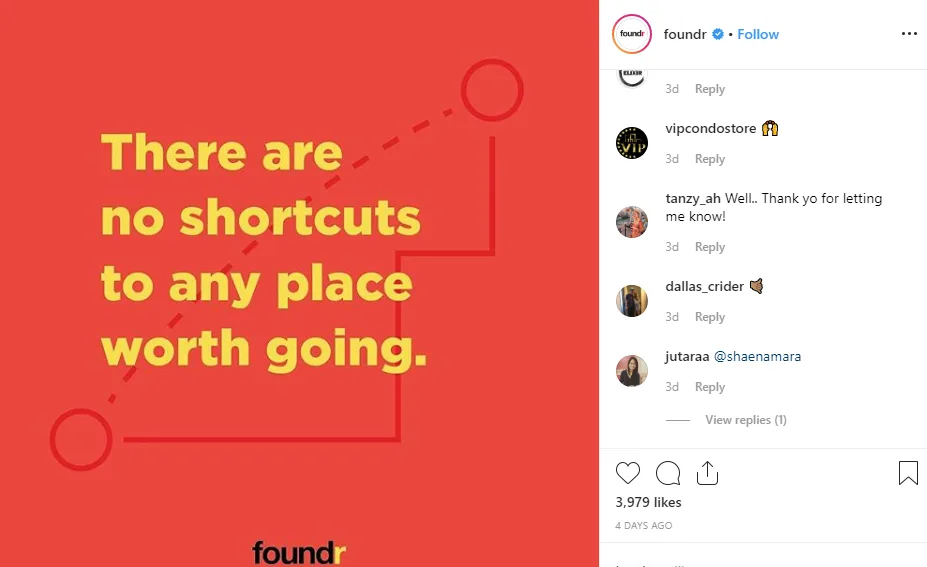
Foundr’s quote posts show the idea: the same layout, a different line each time. You recognize the post before you’ve read a word, and a week of them can be made in one sitting.
3. Set up your tools
Set these up once and they save you time every day.
- Templates for carousels and Reel covers in your design tool, so a new post only needs new words.
- A video editor. Instagram’s own Edits app (opens in new tab) exports without a watermark, and its Ideas tab (opens in new tab) keeps the Reels and audio you saved on Instagram next to your own notes.
- A scheduler, FAQs in chats and Hidden Words (all covered below).
- A short list of hashtags for each pillar, so you don’t search for them every time.
If writing captions is the slow part, AI tools can draft versions for you to edit. Four working affiliates share what they use in my roundup of AI tools for affiliate marketing.
4. Set a posting schedule you can keep
Pick a schedule you could keep in a busy month. Three feed posts a week (say one Reel, one carousel and one more of either) plus Stories on most days is what one batch session can cover.
Run it for two or three months before you judge it, so Insights has enough posts to compare, then move posts to the times your followers are most active.
How to manage your Instagram account in 40 minutes a day
Do it in one sitting, or split it into a morning and an afternoon slot. The fixed time is what matters.
Outside it, close the app.
Thirty minutes go to your own account and ten to everyone else’s.
-
Check today’s post (5 minutes)
Make sure the scheduled post actually went out, answer the first comments, and share it to your Story.
-
Reply to comments (10 minutes)
Newest posts first. Answer questions properly and like the rest. Hidden Words keeps most of the spam out of your way.
-
Clear your DMs (5 minutes)
Paste in your saved answers for the questions you get every week, and let DM automation handle keyword comments, so you only deal with real conversations. Check the General folder and message requests too.
-
Post Stories (5 minutes)
Two or three frames: what you’re working on, a poll or a question box. Stories don’t need to be polished.
-
Engage outside your account (10 minutes)
Leave real comments on five to ten posts from accounts in your niche, and reply to the Stories of people you’d like to know.
-
Log ideas (5 minutes)
Write down questions from comments and DMs, and anything that did unusually well. This list feeds the weekly batch.
Tip
Reply in batches. An answer a few hours later still starts a conversation, and one fixed slot keeps comments from eating your afternoon.
On weekends the scheduled posts keep going out, and a 10-minute check of comments and DMs is enough.
The weekly batch that makes 40 minutes possible
The daily routine only works if the posts already exist.
Block one session a week, about three hours, for everything that doesn’t have to happen live. For three feed posts a week it looks something like this:
| Step | Time | What you finish with |
|---|---|---|
| Review last week | 20 min | The two or three posts worth repeating or remixing |
| Plan the week | 20 min | Three posts mapped to your pillars, each with one goal |
| Create | 90 min | Finished Reels, carousels and covers |
| Write captions | 30 min | Captions with one call to action and up to five hashtags |
| Schedule | 15 min | Every post queued for the next seven days |
| Set up DM automations | 15 min | A keyword reply for each post that offers a link |
| Total | About 3 hours 10 min | A week of posts, ready to go |
Review: in Insights, compare each post’s reach, shares, saves and follows. Shares and saves tell you more than likes about what people found useful.
Copy the numbers into a spreadsheet each week, because Insights only goes back 90 days.
Captions: write in plain words that say what the post is about, because people search Instagram by keyword.
Instagram now lets you use up to five hashtags on a post (opens in new tab), and moving more into a comment doesn’t get around it: the Help Center says that comment won’t post (checked October 2026).
The first version of this post quoted my rule, and it still holds: if a hashtag doesn’t really fit the post, leave it out.
Ideas: start from your ideas log. If a question came up three times in your DMs this week, it’s a post.
Tools that make Instagram account management faster
Start with Instagram’s free tools, and pay for something else only when it saves you more time than it costs.
Schedule posts in Instagram or Meta Business Suite
If your account is public, you can schedule Reels, photos and carousels right in the Instagram app. Before you share, tap More options, turn on Schedule this post and pick a time.
According to Instagram’s Help Center (opens in new tab), you can schedule up to 25 posts a day, up to 30 days ahead (checked October 2026). Collab posts, product tags, sponsored posts and fundraisers can’t be scheduled.
Your queue is under Scheduled content in your profile menu.
Stories aren’t on that list. Meta Business Suite (opens in new tab) fills the gap.
It’s Meta’s dashboard for Facebook and Instagram, free on desktop and as an app, and it schedules posts, Reels and Stories (opens in new tab) to both from one planner (checked October 2026). Its inbox also gathers Instagram comments and messages in one place.
A Story with a poll or a question box takes a minute in the app, so I’d post those live.
When a paid scheduler is worth it
A third-party scheduler earns its price when you post to several networks, run more than one account, or want good posts to come back on a schedule. Pick one that connects through Meta’s official login and never asks for your Instagram password.
SocialBee is built around content categories: each pillar gets its own category and time slots, and evergreen posts can go back into the queue.
Plans start at $29 a month ($24 billed yearly) for five social profiles and ten categories, with a 14-day free trial and no free plan. Even the cheapest plan includes an inbox for comments, mentions and DMs from Instagram business accounts.1
Other common choices: Buffer (opens in new tab) has a free plan for three channels with up to 10 scheduled posts per channel, Metricool (opens in new tab) has a free plan too and puts scheduling and analytics in one place, and Later (opens in new tab) sells its scheduler next to its influencer marketing tools (both free plans checked October 2026). I go through more of them in the best Instagram tools.

SocialBee
Best for: scheduling by content pillar and reusing evergreen posts
Schedules to Instagram and other networks from content categories with their own time slots, and collects Instagram comments, mentions and DMs in one inbox. No free plan, but a 14-day trial.
From $29 a month for 5 profiles
Saved replies, FAQs and Hidden Words
These take most of the repetition out of your inbox, and none of them costs anything.
- Saved replies. Write the answers to your weekly questions once and keep them ready to paste. Meta Business Suite’s inbox can also suggest saving a reply (opens in new tab) you send often and offer it again when it fits.
- FAQs in chats. Business and creator accounts can add up to four questions (opens in new tab) that people see when they start a chat with you, each with an optional automatic answer, so the simple ones answer themselves (checked October 2026). They’re in Messages, under Tools.
- Hidden Words. It hides offensive comments and message requests (opens in new tab), plus any words, phrases, numbers and emojis you add yourself, such as the spam under your posts. The person who wrote a hidden comment isn’t told. It’s in Settings, under How others can interact with you.
Comment-to-DM automation
If your posts offer a link, a template or a download, this saves the most time. Instead of answering “link please” a hundred times, ask people to comment a keyword (“Comment PLAN for the template”), and a DM automation tool sends the link as a private reply within seconds.
Meta sets the rules for these private replies to comments (opens in new tab), and every tool has to follow them: one message per comment, sent within seven days; follow-ups only if the person answers, within 24 hours of their answer; and the message lands in their inbox if they follow you, or in message requests if they don’t.
ManyChat is an official Meta Business Partner, so it works through Meta’s API and never logs in as you.
Its free plan covers 25 active contacts a month, enough to try one keyword. Paid plans start at $17 a month ($14 billed yearly) for 250 contacts, plus a fee for each contact above that.2

ManyChat
Best for: sending your link to everyone who comments a keyword
Comment-to-DM automation for Instagram through Meta’s official API. The free plan is small, and paid plans are priced by active contacts, so the cost grows with your audience.
Free for 25 contacts a month, then from $17 a month
Set up one keyword per post in your weekly batch, and test it from a second account before the post goes live.
Comment-to-DM
Set up your first keyword reply
My Instagram for bloggers guide walks through it: one keyword per post, a first message that stands on its own, a follow-up question, and how to count the results.
Get outside your own posts
It’s tempting to spend all your Instagram time on your own feed. But replying to your own comments doesn’t bring anyone new.
The ten minutes on other accounts in the daily routine do, and so do Stories and collabs.
- Comment like a person. A real comment on a post in your niche puts your name in front of that account and everyone reading the comments. “Nice post!” doesn’t.
- Use Stories every day. They’re informal and quick, and the place for polls, questions and the link sticker. Short of ideas? Try these Instagram Story ideas.
- Collab instead of trading shoutouts. A collab post (opens in new tab) appears on both profiles and is shown to both sets of followers. Collab posts can’t be scheduled, so publish them live. For shoutout swaps, see how Instagram shoutouts work.
- Share with credit. Share other creators’ posts to your Story with their tag, and ask before you re-upload anything to your feed. It builds the same relationships without taking their work.
What to stop doing
Skip these
- Thirty hashtags, or hashtags hidden in the first comment. Instagram now allows five, and comments count toward the limit.
- Separate alert tools just to see new comments. The app’s notifications and Meta Business Suite’s inbox already show them.
- Engagement groups and follow-for-follow. They go against Instagram’s guidelines and bring followers who don’t care about your topic. Read why engagement groups backfire.
- Apps that ask for your Instagram password or automate likes and follows. They break Instagram’s terms and put your account at risk.
- Posting everything live. If you make each post on the day, the 40 minutes turn into two hours.
Try it for one week: one batch session, then the daily routine, and change the times to what you actually need.
Then put the time you get back into making money on Instagram. More on building an audience is in my creator growth guides.
Managing an Instagram account: frequently asked questions
How much time does it take to manage an Instagram account?
About 40 minutes a day for comments, DMs, Stories and engaging with other accounts, plus one batch session a week of about three hours to plan, create and schedule three feed posts. Post less and the batch gets shorter.
Can I schedule Instagram posts for free?
Yes. If your account is public, you can schedule Reels, photos and carousels in the Instagram app, up to 30 days ahead and 25 a day. Meta Business Suite is free too and can also schedule Stories.
How do I manage Instagram comments and DMs faster?
Answer them in one fixed slot a day instead of as notifications arrive. Keep saved answers for repeat questions, add FAQs to your chats, use Hidden Words to filter spam, and let comment-to-DM automation send links to everyone who comments a keyword.
Is it safe to use third-party tools to manage my Instagram account?
Yes, if they connect through Meta’s official login and API and never ask for your password. Tools that log in as you or automate likes and follows break Instagram’s terms and put your account at risk.
How often should I post on Instagram?
As often as you can keep up. Three feed posts a week plus Stories on most days is a schedule one weekly batch session can cover. Check Insights after two or three months and adjust.