Someone taps your name under a Reel, lands on your profile and gives it a few seconds. In that time, 150 characters have to tell them who you are, why they should follow and where to go next.
By 2020 I’d grown my own account, @gettinggrowth, to nearly 40,000 followers. Since then Instagram has added up to five links, pronouns and broadcast channels, and it has spelled out how search uses your name and bio.
Key takeaways
- Say who the account is for, what they get and what to do next.
- Put your topic in the name field and your bio. Instagram’s own search tips say so.
- You get up to five links. The one that matters most goes first, ideally an email sign-up.
- Skip fancy fonts and dated offers, and reread your bio every few months.
What makes a good Instagram bio
There’s no golden rule for the wording, but the bios that work tend to be:
- Clear. A stranger gets what you do after one line.
- Specific. One concrete detail (a number, a result, a place) beats three adjectives.
- Personal. It sounds like a person wrote it.
- Findable. The words people search for are in your name field and bio.
- Focused. It ends with one call to action.
- Current. No expired launches or old dates.
What’s on your Instagram profile in 2026
In 2020 a profile had room for one link. Now there’s a lot more around the bio, most of it set in Edit profile.
| Part | What it does | What to do |
|---|---|---|
| Username | Your @handle and profile URL; search matches it | The name people know you by, without random numbers |
| Name field | The bold line above your bio; Instagram suggests one that fits your topic | Your name plus your topic, such as “Lena | Weekend trips by train” |
| Profile photo | A small circle next to everything you post | Your face for a personal brand, a simple logo for a company |
| Pronouns | Up to four (opens in new tab), chosen from Instagram’s list; you can show them to followers only | Optional, and not available to everyone yet |
| Category label | “Digital creator”, “Coach” and so on, under your name on a professional account | Keep it if it helps, or hide it under Profile display (opens in new tab) |
| Bio | Up to 150 characters (opens in new tab); hashtags and @mentions in it are clickable | Who it’s for, what they get, one next step |
| Links | Up to five (opens in new tab), in the order you set | Put your most important link first |
| Contact options | Email, phone or address buttons on a professional account | Use them instead of spending bio characters on an email address |
| Highlights | Saved Stories in circles under your bio | A few clearly named ones: “Start here”, “Results”, “Free guide” |
| Broadcast channel | A one-to-many chat with your followers; public accounts with more than 1,000 followers (opens in new tab) can start one | If you run one, pin it to your profile (opens in new tab) so followers can join |
Two of these matter more than they look. Instagram’s own explanation of search (opens in new tab) says it matches what people type against usernames and bios, and tells you to put your topic in both your profile name and bio.
And Highlights work as an extended bio that doesn’t disappear after 24 hours. Need ideas? Try these Instagram Story ideas.
How to write a perfect Instagram bio, step by step
Draft it in a notes app first, where you can try a few versions.
-
Decide who the bio is for
One reader, in one sentence: “beginner watercolor painters”, “freelancers who hate invoicing”. If you can’t say it, your bio can’t either.
-
Put your topic in the name field
Your name, a separator and the words that reader would search for.
-
Write the first line: what you do, for whom
“Train-trip guides for Europe” or “I help engineers land senior roles”. Plain words beat slogans.
-
Add one line of proof or personality
A number (“12 years as a hiring manager”), a result, or the running joke your followers know.
-
End with one call to action
Say what’s behind your first link: “Free packing list by email ↓”. Three competing asks get none.
-
Set up your links
The link you care about most goes first. Tip 7 below has the rest.
-
Read it on a phone, then put a reminder in your calendar
Look at it the way visitors do. Every few months, remove offers that ended and update any dates or numbers.
7 tips for a better Instagram bio
These go back to the 2020 version of this post, updated for today’s Instagram.
Tip 1: Convey your personality
People follow people, even on a business account.
Let your voice show: a catchphrase, a dry line about what you do, whatever sets you apart from a hundred lookalikes. That’s often why people pick a small account over a bigger one.
Put it in the second line, though. The first line still has to say what you do, and if you want to make money on Instagram, that clarity is what pays.
Tip 2: Use a good photo
If you’re the face of your business, use your face: well lit, cropped tight, plain background, because it shows as a small circle. A company or a team can use its logo, simplified so it still reads at that size.
Use the same photo on your other platforms so people recognize you. More on first impressions in my guide to growing on Instagram.
Tip 3: Break it up
Most visitors scan a bio rather than read it, so give each idea its own short line. Type the line breaks in Edit profile, then open your profile to check they stayed.
Tip 4: Keep it to the point
Every line should help a stranger decide to follow you or tap your link.
If it doesn’t, cut it.
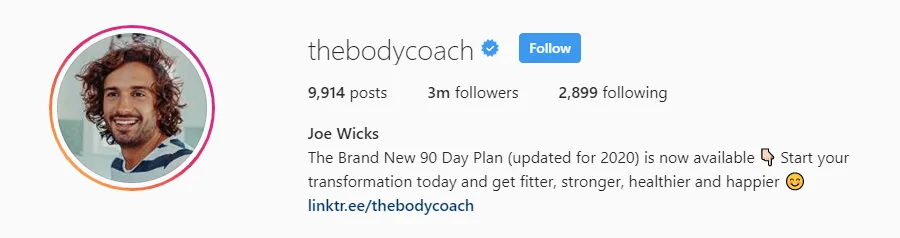
Write in plain text, too. The “fancy fonts” from generator sites are special Unicode characters, and screen readers skip them or read out something unrelated (opens in new tab), so some visitors hear nonsense.
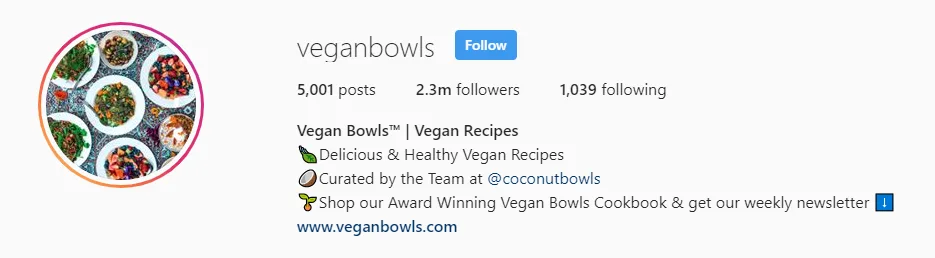
Tip 5: Use emojis as bullets
An emoji at the start of each line works like a bullet point, and the right one says “food”, “travel” or “money” before anyone reads a word. Keep it to a few, because screen readers read each emoji’s name out loud.
Tip 6: Use branded and clickable #hashtags
Hashtags and @mentions in your bio have been clickable since 2018 (opens in new tab).
A branded hashtag lets followers share their posts with you, which gives you content to reshare. An @mention can send people to your second account or your podcast.
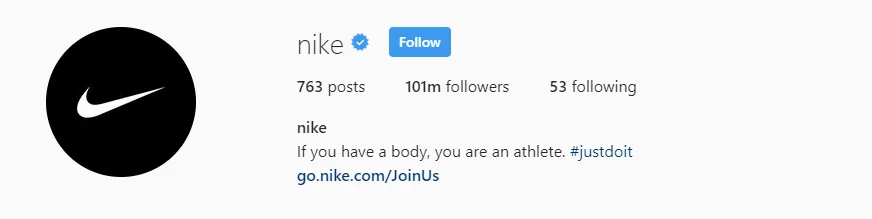
One is plenty.
Every tap takes the visitor away from your profile, so only add one that’s yours.
Tip 7: Make the most of your bio links
In 2020 your profile had room for one website link. Since April 2023 (opens in new tab) you can add up to five (opens in new tab) and reorder them, and visitors see them in that order.
So the order matters.
- First link: the one action you want most, usually your email sign-up.
- Links two to five: your newest post or product, your website, a booking page, a free tool.
- Tracking: add UTM parameters, so your analytics show what came from your bio. My guide to Instagram for bloggers has a simple scheme.
Then point to the first link in your last bio line (“Free checklist ↓”).
Link in bio: Instagram’s links or a link-in-bio tool?
Link-in-bio tools took off when Instagram allowed one link. With five built in, plenty of accounts don’t need one any more.
| Option | Instagram’s own links | A page on your site | Linktree | Beacons |
|---|---|---|---|---|
| Cost | Free | Part of your website | Free plan (opens in new tab); paid plans add features | Free plan; paid plans from $10 a month (opens in new tab) |
| Links | Up to 5 | As many as you want | Unlimited, even on the free plan | Unlimited, even on the free plan |
| Your own domain | Yes, links go straight to your pages | Yes | No, a linktr.ee page (no custom domains (opens in new tab)) | On paid plans; free pages are on beacons.ai |
| Email sign-up | As one of the links | Your own form | As a link to your sign-up page | Built in; 50 email sends a month on the free plan |
| Selling | No | With your own shop | On paid plans | Store built in; 9% fee (opens in new tab) on the free and $10 plans |
| Best for | Most accounts with up to five destinations | Bloggers and newsletter writers with a website | Many links and no website | Selling digital products without a website |
Start with the simplest option that works: Instagram’s own links, the first one going to an email sign-up.
Need more than five and have a website? A “start here” page on your own site beats a third-party page, because visitors land on your domain.
If you’d rather not build one, Linktree (opens in new tab) is the best-known link page and Beacons (opens in new tab) adds a store and email tools.
Send the first link to your email list
A follower sees your posts when the algorithm decides to show them. A subscriber gets every email you send.
So the best first link for most creators is a sign-up page with one reason to join, like a checklist or a short course by email.
You don’t need a website for it.
Kit (formerly ConvertKit) has a free plan for up to 10,000 subscribers (opens in new tab) with landing pages and sign-up forms, so your bio link can go straight to a sign-up page. Automated sequences need a paid plan (checked October 2026).
Or skip the link entirely. End your bio with “DM me GUIDE” and let a tool such as ManyChat reply with the link through a keyword trigger (opens in new tab).
Its free plan (opens in new tab) covers up to 25 active contacts a month (checked October 2026), which is enough to try it. For keywords in comments, Instagram for bloggers covers Meta’s rules.
Next step
Turn your bio link into income
How a newsletter fits next to brand deals, affiliate links and your own products, and why it’s the income Instagram can’t take away.
Instagram bio examples: before and after
Here’s the GettingGrowth bio from February 2020, when this post first went up.
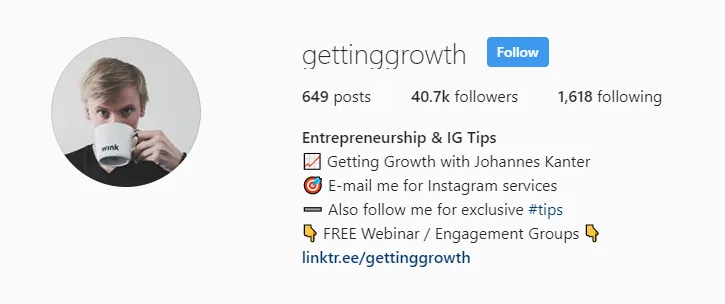
Short lines, emojis as bullets, a clickable hashtag: fine. But it asks for four things in four lines, because past me wanted everything at once, and the name field has a topic but not my name.
I’d also warn you off engagement groups today: they break Instagram’s rules on inauthentic activity (more in my guide to engagement groups).
This is how I’d write it now.
| Part | February 2020 | Rewritten for 2026 |
|---|---|---|
| Name field | Entrepreneurship & IG Tips | Johannes | Creator business software |
| Line 1 | Getting Growth with Johannes Kanter | Build an audience. Turn it into a business. |
| Line 2 | E-mail me for Instagram services | Guides, comparisons and free tools |
| Line 3 | Also follow me for exclusive #tips | New guides by email ↓ |
| Line 4 | FREE Webinar / Engagement Groups | (gone) |
| Links | One Linktree link | 1: newsletter sign-up · 2: newest guide · 3: free tools |
| “E-mail me”, but no address | The Email button (contact options) |
Instagram bio templates you can copy
These accounts are made up, and each bio is under 150 characters.
| Account | Name field | Bio |
|---|---|---|
| Course creator | Maya | Watercolor for beginners | Paint your first sunset in 30 days 🎨 Free 3-lesson mini-course by email ↓ |
| Newsletter writer | Sam | Money for freelancers | One email every Sunday on pricing, taxes and invoices. Join [number] freelancers ↓ |
| Coach | Priya | Career coach for engineers | Ex-hiring manager. I help engineers land senior roles. Free résumé checklist: DM me CV |
| Blogger | Lena | Weekend trips by train | Train-trip guides for Europe, every Tuesday 🚆 Get the next one by email ↓ |
| Local business | Corner Loaf | Bakery in Austin | Sourdough baked daily, 7am to 2pm 🥖 Pre-order for the weekend ↓ (address in contact options) |
If you’re growing as a creator, my guide to becoming a micro-influencer covers what brands look for when they check your profile.
Instagram bio mistakes to avoid
Watch out
- Fancy fonts. Screen readers stumble over them.
- “Follow for follow” and engagement groups. They bring followers who don’t care about your topic.
- A homepage as your only link. People have to find what they came for, and most won’t.
- Three calls to action. Pick one and move the others into links two to five.
- Dates and expired offers. “Updated for 2020” tells every visitor in 2026 that nobody is minding the account.
- “DM for collabs” with no email. Brands want an address, so add the Email button.
- A row of hashtags. Ten generic ones look like spam.
Final thoughts
There’s no single perfect Instagram bio, only one that fits what you offer right now. When the offer changes, change the bio the same day.
For what to post once people follow you, read my guide to growing on Instagram, or browse all the creator growth guides.
Instagram bio: frequently asked questions
What makes a perfect Instagram bio?
It says who the account is for and what they get, adds one concrete detail, and ends with one call to action. Your topic goes in the name field, so people find you in search.
How many characters can an Instagram bio have?
Up to 150, according to Instagram’s Help Center (checked October 2026). Your name, links, contact options and Highlights don’t count toward it.
How many links can I add to my Instagram bio?
Up to five, since April 2023. You choose their order, so put the most important link first.
Do I still need Linktree or another link-in-bio tool?
Not if five links are enough. A link-in-bio tool helps if you want more links or a store without a website. With a website, a “start here” page there is usually better.
Does my bio help people find me in Instagram search?
Yes. Instagram matches what people type against usernames and bios, and it recommends a profile name and bio keywords that describe your topic.
Should I use emojis or special fonts in my bio?
A few emojis are fine, especially as bullets at the start of each line. Skip the special fonts from generator sites, because screen readers can’t make sense of them.