You can run an Instagram account with nothing but the app.
Most people do.
But a few tools save real hours every week, and these are the ones still worth a look in 2026.
The first version of this list is from 2019, and it aged badly. Seven of its twelve tools are gone or do something else now, and some of the old links lead to sites that have nothing to do with Instagram.
I kept the five that still work, added SocialBee and ManyChat, and checked every price again in October 2026.
How I picked these
From each tool’s own website (what it does today and what it costs) and from my own Instagram work.
I used SocialBee, Iconosquare, ManyChat, Later, Hopper HQ and Plann back when I ran Instagram accounts, but that was years ago and they’ve all changed a lot since. I haven’t used Planoly, Wishpond, Foursixty or Clipchamp.
None of them has been through a proper test for a review, so there are no ratings and no winner, and the order follows the job each tool does. A full rebuild of this list with current versions is coming.
The best Instagram tools at a glance
| Tool | Use it for | Starting price |
|---|---|---|
| SocialBee | Scheduling by content category | $29 a month ($24 billed yearly) |
| Planoly | Planning your grid visually | Free in the app; paid from $14 a month |
| Iconosquare | Analytics and reports | Free plan; paid from €9 a month billed yearly |
| ManyChat | Answering comments and DMs automatically | Free for 25 contacts; paid from $14 a month billed yearly |
| Wishpond | Giveaways and contests | Not published |
| Foursixty | Shoppable galleries for online stores | From $90 a month |
| Clipchamp | Video editing | Free; Premium with Microsoft 365 |
1. SocialBee: scheduling by content category
SocialBee sorts your posts into content categories, say tips, behind the scenes and offers, and gives each category its own time slots. You fill the categories, it fills the calendar, and good posts can be recycled so the queue doesn’t run dry.
For Instagram it publishes posts and Reels, previews your grid, and collects comments, mentions and DMs from business accounts in one inbox.
Price (checked October 2026): $29 a month, or $24 a month billed yearly, for 5 social profiles and 10 content categories. There’s no free plan, but there’s a 14-day trial without a card. See SocialBee’s pricing (opens in new tab).

SocialBee
Best for: scheduling by content type and reusing good posts
Schedules posts and Reels to Instagram and other networks from content categories with their own time slots, and collects Instagram comments, mentions and DMs in one inbox. No free plan; a 14-day trial without a card.
From $29 a month for 5 profiles
How scheduling fits into a normal day is in how to manage your Instagram account in 40 minutes a day.
2. Planoly: plan your grid visually
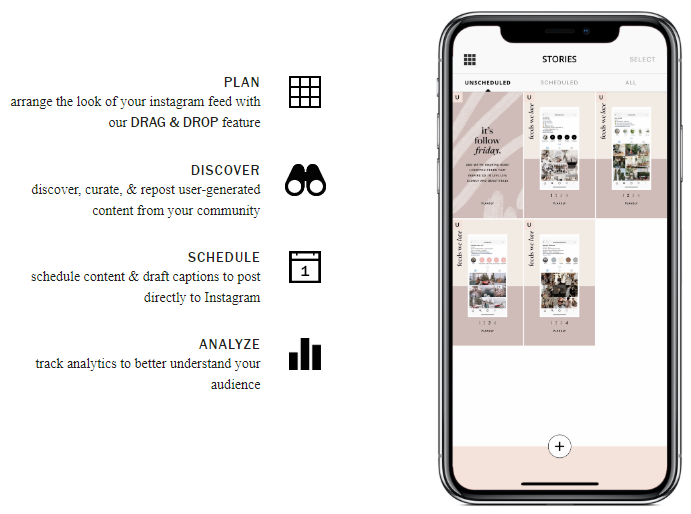
Planoly (opens in new tab) started as a way to see your Instagram grid before you post, and that’s still its strength: drag posts around until the feed looks right, then schedule them.
When Instagram doesn’t allow auto-posting (a post with music, for example), it sends you a reminder to post from the app. The paid plans also include a link-in-bio page, selling digital products and Instagram DM automation.
Price (checked October 2026): free in the mobile app with 10 uploads a month. Paid plans are $14 a month (Starter, one social set), $24 (Growth) and $47 (Pro), up to 15% less billed yearly, each with a 14-day trial. See Planoly’s pricing (opens in new tab).
If Planoly doesn’t click, Later (opens in new tab), Hopper HQ (opens in new tab) and Plann (opens in new tab) also plan and schedule Instagram posts from a calendar.
Later starts at $18.75 a month billed yearly, Hopper HQ prices by the number of accounts you connect, and Plann has a free plan for Instagram with paid plans from $12.50 a month billed yearly.
All three have a free trial. Prices checked October 2026 on Later’s (opens in new tab), Hopper HQ’s (opens in new tab) and Plann’s (opens in new tab) pricing pages.
3. Iconosquare: analytics and reports
Instagram’s own Insights are free and fine for a single account.
Iconosquare (opens in new tab) is for when you want more: custom dashboards, a longer history, Reels analytics and reports you can send to a client or a boss. It schedules posts too, and the higher plans add an inbox for comments and DMs, approval workflows, and competitor and hashtag tracking.

Price (checked October 2026): free for 2 profiles, 10 posts a month per profile and one month of analytics history. Paid plans start at €9 a month billed yearly (Starter); automated reports and the inbox start on Launch, from €33 a month billed yearly.
There’s a 14-day trial, and Iconosquare shows prices in your region’s currency. See Iconosquare’s pricing (opens in new tab).
4. ManyChat: answer comments and DMs automatically
In 2019 we ran tests with client accounts, and the ones that interacted with their existing followers got higher engagement and attracted more new followers than the ones that only posted.
I don’t think that’s changed.
The problem is volume: once a post takes off, nobody can answer every comment by hand.
ManyChat does the answering. Someone comments a keyword under your post (“Comment PLAN for the template”), and ManyChat sends them the link by DM.
It can also greet new followers, collect emails in the chat and run giveaways. ManyChat is an official Meta Business Partner, so it works through Meta’s own tools.
The setup, and Meta’s rules for these replies, are in Instagram for bloggers.
Price (checked October 2026): free for 25 active contacts a month, with up to four automations and ManyChat branding. Essential is $14 a month billed yearly ($168) for 250 active contacts, and you pay for each contact beyond that.
An active contact is a person you interact with that month, not a follower. Essential and Pro have a 14-day trial. See ManyChat’s pricing (opens in new tab).

ManyChat
Best for: sending your link to everyone who comments a keyword
Replies to Instagram comments and DMs automatically, through Meta’s official tools. The free plan covers 25 active contacts a month; paid plans include more contacts and charge for each extra one.
Free plan, then from $14 a month billed yearly
5. Wishpond: giveaways that grow your email list
Giveaways still bring reach, but a follower you won with a free prize is easy to lose again.
An email address stays.
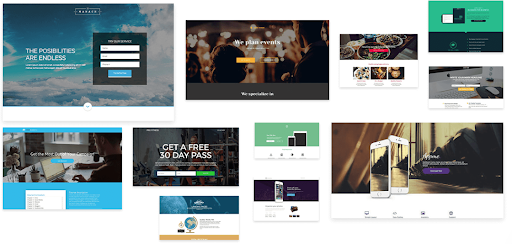
Wishpond (opens in new tab) is a marketing suite (landing pages, forms, email) with a Social Promotions tool for contests, giveaways and referral campaigns. People enter through a form, so a giveaway you promote on Instagram also fills your email list. It connects to Shopify and WooCommerce if you sell online.
If all you need is “comment to enter”, ManyChat can handle that part.
Price (checked October 2026): Wishpond doesn’t publish prices. Its pricing link books a demo, and its free trial button doesn’t say how long the trial lasts. See Wishpond’s pricing (opens in new tab).
6. Foursixty: shoppable Instagram galleries for online stores
Foursixty (opens in new tab) is for brands that sell online. It turns your Instagram and TikTok posts, and the photos your customers post of your products, into shoppable galleries on your site, and it has a Shopify app.
It also tracks creator campaigns, handy if you send products to micro-influencers. Real customers wearing or using your product make better social proof than another studio shot.

Price (checked October 2026): from $90 a month (Essential, shoppable Instagram galleries). Customer photos (UGC) start on Complete at $300 a month. Plans are month to month, with a 14-day trial.
That’s priced for a store with real sales, not for a creator with a small merch side line. See Foursixty’s pricing (opens in new tab).
7. Clipchamp: edit videos in the browser
Clipchamp (opens in new tab) is Microsoft’s video editor. It runs in the browser, has templates sized for Reels, and the free plan exports in 1080p without a watermark, which is plenty for Instagram.
Price (checked October 2026): free with a personal Microsoft account. Premium (4K exports, premium stock and a brand kit) comes with a Microsoft 365 Personal or Family subscription. See Clipchamp’s pricing (opens in new tab).
What I took off the list
The 2019 list had twelve tools. These no longer belong on it:
- SocialRank and Have2HaveIt. Their old domains now redirect to sites that have nothing to do with Instagram.
- Boost, the comment-to-buy app. Its domain now belongs to an unrelated product.
- Magisto. The site redirects to Vimeo’s video editor.
- Tagboard. It now makes live graphics for TV news, sports and entertainment.
- SocialCaptain and Combin. Growth bots that followed, liked or commented on other accounts for you. SocialCaptain’s domain redirects to another growth service, and Combin’s to a podcast recording app.
I wouldn’t use a growth bot even if one still worked.
Meta’s spam rules (opens in new tab) cover engaging with content “manually or automatically, at very high frequencies”, which is exactly what these tools did, and that puts your account at risk. Why the shortcuts don’t pay off is in my post on Instagram engagement groups.