How many times have you seen a creator you follow recommend another account in their Stories? A lot, right? That’s a shoutout, and it only works between accounts with the same kind of follower.
Free Instagram shoutouts from the right account can bring you new followers in a day. One from a page that features anyone who asks usually brings nobody who stays.
Key takeaways
- A shoutout only helps when both accounts’ followers care about the same thing.
- Free shoutouts come from relationships: accounts in your niche, of a similar size, that you helped first.
- Ask for a Collab post instead of a shoutout. It shows up on both profiles and in both accounts’ feeds.
- A paid or gifted shoutout is an ad, so say so in the post.
What is an Instagram shoutout?
An Instagram shoutout is when one account promotes another to its followers, in a feed post, a Reel, a Story or a Live. It says what it likes about you, your product or your posts, and invites its followers to check you out.
It’s influencer marketing on a small scale, and accounts of any size can do it. What matters is whether the other account’s followers are the people you want to reach.
The three types of Instagram shoutouts
1. Paid shoutouts
The simplest route is to pay, in money or in product. Two kinds of accounts sell shoutouts:
- Feature pages repost other people’s content in a niche (makeup, Etsy finds, travel photos) and sell “features” by DM.
- Creators recommend products to followers who trust them. Paying one is a brand deal, a “paid partnership” in Instagram’s terms.
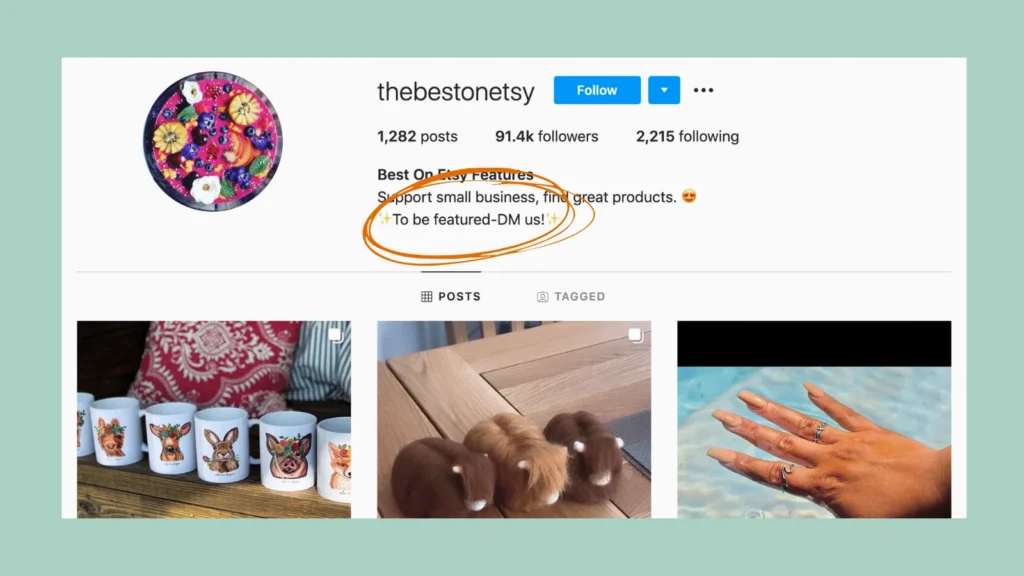
Feature pages are cheap, and that’s the catch. Their followers came for the reposts, and some were bought.
Meta’s branded content policies (opens in new tab) also say creators can’t take anything of value for posting content they didn’t make or appear in, which is hard to square with a paid repost.
Before you pay anyone, ask for Insights screenshots (recent reach, where the followers live), read the comments for real conversations, and compare the engagement with the follower count. Ask for a discount code or a tracked link to see what the shoutout sold, and expect prices to rise before Black Friday and the holidays.
Paid shoutouts have to be disclosed. If you’d rather be the one getting paid, see how to become a micro-influencer.
2. Shoutouts for shoutouts (S4S)
The name says it all: you swap shoutouts with another account, often written S4S. A features B and explains why its followers would like it, then B does the same for A.
It works best between accounts that serve the same kind of follower, and the strongest swaps give a taste of the other account, like a Reel you make together. These days the easiest way to do that is a Collab post.
3. Free (unpaid) shoutouts
The best shoutout is the one nobody paid for: a customer, a peer or a bigger account recommends you because they like what you make. You can’t buy these, but you can make them a lot more likely.
9 tips to get free Instagram shoutouts
1. Create content worth sharing
Why would another account share your post? Because, like you, they want to give their followers something worth their time.
Make posts that are useful, funny or beautiful enough to send to a friend, and make them your own: Instagram stops recommending accounts that keep reposting other people’s content (opens in new tab) without changing it.
My guide to becoming known on Instagram covers the Reels and carousels that get shared.
2. Find accounts in your niche
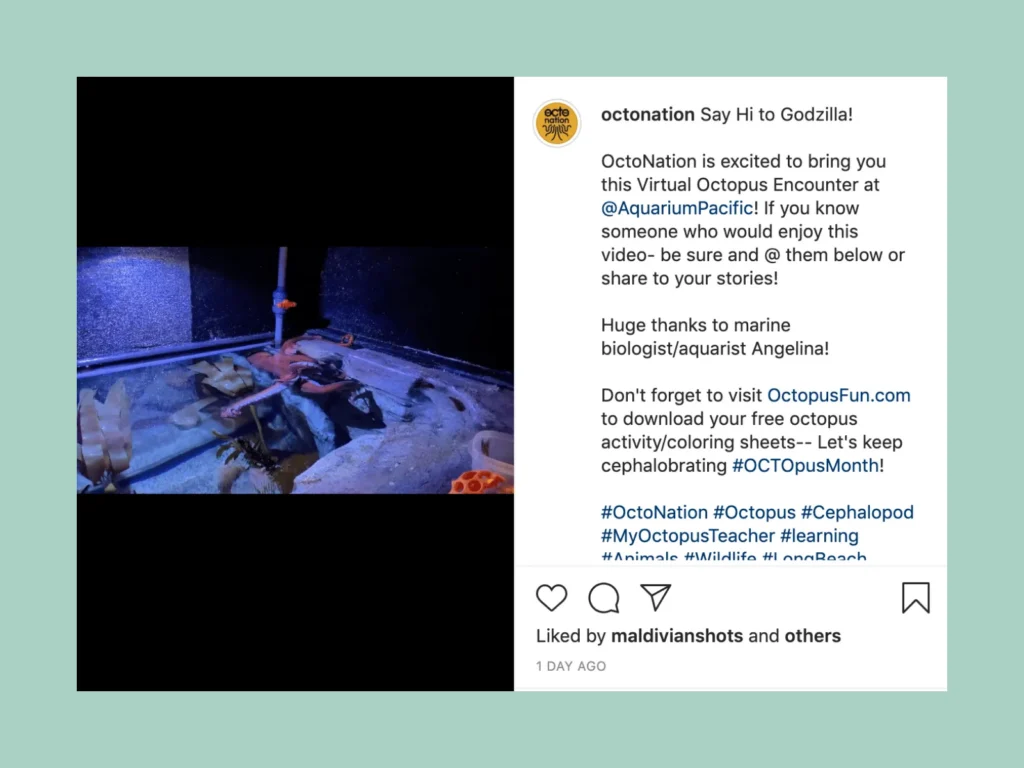
Look for accounts whose followers would enjoy your posts too: two accounts for ocean lovers, say, or for vegans in Miami. Here, the octopus fan account OctoNation shares a video from the Aquarium of the Pacific:
Accounts that complement yours often work better than competitors: a sourdough baker and a maker of bread knives, or a dance studio and a shop that sells dance shoes.
3. Shine a light on other accounts first
The easiest way to get noticed is to promote the other account first: share one of its posts to your Story with a line on why you like it, and mention the account.
When you mention someone in your Story (opens in new tab), they’re notified and can add it to their own Story, unless you’ve turned re-sharing off.1 That puts you in front of their followers and gives you a reason to DM them later.
More ideas are in my Instagram Story ideas.
4. Look for accounts with a similar number of followers
You’re most likely to get a free shoutout from accounts of a similar size, or a step ahead of you.
An account with 50,000 followers has little reason to promote one with 500. Two accounts with 2,000 each both gain from a swap, and your list of possible partners grows as you do.
5. Build the relationship first
Give before you ask.
Follow the account, leave comments that add something (“Great post!” doesn’t count), follow them on Threads, LinkedIn or their newsletter, and answer when they ask their audience a question.
They’ll check your bio before saying yes, so make it clear at a glance who you are (my guide to the perfect Instagram bio shows how). Once you’re on their radar, and sure the two of you are a good match, suggest a collab.
6. Keep a list of partner accounts
List every account you’d like to work with, so you pick partners on purpose. A spreadsheet does the job: handle, niche, follower count, how they like to be contacted, when you last talked and what you proposed.
7. Send your product
Large accounts usually want to be paid, but a product that fits their audience perfectly can still earn a free mention, and smaller creators are often happy to share something they love.
Send it with a short note and no strings attached, and expect to send many products for a few shoutouts. Whoever posts about a gift has to disclose it.
8. Use search and hashtags to find partners
Instagram search is now the quickest way to find accounts in your niche. Type a few words, such as “Scandinavian interiors” or “vegan Miami”, and look at the accounts and Reels it shows.
Hashtags help too. A Scandinavian homeware brand might browse #scandinavianstyle or #simpleliving, and for local partners there are your city’s hashtags.
Instagram now allows up to five hashtags per post (opens in new tab),2 so the few an account picks say a lot about who it’s for.
#S4S and #shoutout4shoutout still exist. In my experience these aren’t the best shoutouts you can get, but you might find a few relevant accounts there to build relationships with.
9. Pitch by DM or email
Check the bio for how the account likes to be contacted, and make your message personal. Creators of every size complain about generic pitches.
Don’t be that person!
A good pitch is short and has five parts:
-
Show you know their account
Name a post you liked and say why.
-
Say who you are in one sentence
Your account, who it’s for and roughly how many followers you have.
-
Propose one concrete idea
A Collab Reel, a swap of Story features or a Live together. “Let’s collaborate” on its own leaves all the work to them.
-
Say what’s in it for their followers
It’s the first thing they’ll ask themselves.
-
Make it easy, and follow up once
Offer to do the work and suggest a date. No reply after a week or two? Send one friendly reminder, then let it go.
An example pitch (illustrative)
“Hi Lena, your Reel on proofing sourdough in a cold kitchen saved my last loaf. I run @breadbykai, about 3,000 home bakers, mostly in Germany.
“Would you make a Collab Reel with me: your starter, my scoring patterns, one loaf from start to finish? I’d film and edit my half and send you a draft by Friday.
“Your followers ask a lot about shaping, so I think they’d like it.”
Better than a shoutout in 2026: Collabs, Remix and Lives
Since I first wrote this post in 2020, Instagram has built the shoutout into the app. These features usually do the job better.
| Compared on | Free shoutout or swap | My pickCollab post | Paid feature page | Paid partnership with a creator |
|---|---|---|---|---|
| What it is | A post or Story on one account that recommends another | One post published by both accounts | A repost of your content on a page that sells features | A creator you pay recommends you in their own post |
| Who sees it | The other account’s followers | Both accounts’ followers | The page’s followers | The creator’s followers |
| Cost | Free, or a shoutout in return | Free | Usually low | A fee, a product or both |
| Stays on your profile | No | Yes | No | Only if made as a Collab |
| Disclose | If anything was exchanged | If anything was exchanged | Yes | Yes |
| Best for | Accounts of a similar size in one niche | Partners who’ll make something together | Rarely worth it | Reaching buyers through a voice they trust |
Collab posts
When you share a feed post or a Reel, you can invite other accounts as collaborators (opens in new tab), up to five on a feed post.3 A public account can invite anyone; a private one only its followers.
Once they accept, the post appears on their profiles and in their followers’ feeds too. A swap becomes one post that both audiences see, and nobody has to write “go follow @…” in a caption.
That’s why my guide to getting known on Instagram recommends Collabs over shoutout pages.
Remix
Remix (opens in new tab) lets you make a Reel that includes all or part of someone else’s Reel or post, and it credits the original creator.4 Answering a partner’s Reel with your take or the next step is a shoutout that also shows your work.
Remix is on by default for public accounts, but creators can turn it off (opens in new tab), so ask first if you plan a series together.
Lives with a guest
One of you starts the Live and invites the other as a guest. Interviews and Q&As work well.
Announce the date in both accounts’ Stories a few days ahead, so both audiences show up.
Creator partnerships
The longer version of a shoutout is a partnership: a Story takeover, or a guide you make together.
If you both have newsletters, recommend each other there too: a subscriber is someone you can reach whatever the algorithm does (more in my guide to making money on Instagram). Kit has this built in, even on its free plan (opens in new tab), through its Creator Network.5
Turn the shoutout into a Collab
When an account agrees to a shoutout, suggest a Collab instead. It’s no extra work for them, and the post stays on your profile too.
Shoutout tactics that backfire
Watch out
- S4S chains and follow loops. Long swap chains and “follow everyone we tag” rounds bring followers who don’t care about your topic. Meta’s spam policy (opens in new tab) bans exchanging engagement such as likes and follows, though it allows cross-promotion that nobody paid a third party for.
- Pages with bought followers. A big count with little engagement usually means fake followers, who never watch or buy. In the US, the FTC’s rule on fake reviews and testimonials (opens in new tab) bans buying fake followers or views to misrepresent your influence for commercial purposes.
- Engagement groups. Swapping likes and comments breaks the same spam rules and shows your posts to the wrong people. Here’s why engagement groups backfire.
- Reposting without permission. Many feature pages repost without asking. Being featured that way isn’t a partnership, and an account built on reposts drops out of recommendations.
How to disclose a paid shoutout
If money, a free product or any other benefit changes hands, a shoutout is an ad, and whoever posts it has to say so.
In the US, the FTC’s Disclosures 101 for Social Media Influencers (opens in new tab) asks for a disclosure whenever there’s a financial, employment, personal or family relationship with the brand, free products included.
Put it in the post itself, where it’s hard to miss, in plain words like “ad”, “sponsored” or “thanks to [brand] for the free product”. “Spon” or “collab” on their own aren’t enough.
On Instagram, also turn on the “Paid partnership” label and tag the brand, which Meta’s branded content policies (opens in new tab) require. The FTC says not to rely on a platform’s tool alone, so add your own words too.
Europe and the UK have similar rules, covered in my guide to becoming a micro-influencer.
If you’re the one paying, check that the account discloses. A hidden ad hurts your brand too.
Next steps for your free shoutouts
Pick three small shoutout tasks for this week:
- List ten accounts in your niche, of a similar size, whose followers would like your posts.
- Share two of their best posts in your Stories and mention them.
- Send one Collab pitch, using the five steps above.
Make sure you add a fourth task: bookmark this post and come back in a month to check your progress.
When a collab brings new followers, give them a reason to join your newsletter. More guides are in creator growth.
DM automation
Turn a collab that takes off into subscribers
When a Collab Reel brings a wave of comments, comment-to-DM automation sends your link to everyone who asks.
Instagram shoutouts: frequently asked questions
What does S4S mean on Instagram?
S4S means “shoutout for shoutout”: two accounts promote each other to their followers.
It works between accounts with the same audience. In long chains of unrelated accounts, it mostly brings the wrong followers.
Are free Instagram shoutouts worth it?
From an account whose followers care about your topic, yes. From pages that feature anyone, rarely.
A Collab post with the same account is usually worth even more, because it appears on both profiles.
How much does a paid shoutout on Instagram cost?
There’s no standard price. Feature pages often charge little, and creators in your niche more: Influencer Marketing Hub’s rate guide (opens in new tab) says many micro-influencers charge roughly $100 to $500 per Instagram post (checked October 2026).
Ask for Insights screenshots before you pay.
What’s the difference between a shoutout and a Collab post?
A shoutout is a post on one account that recommends another. A Collab post is one post shared by both accounts, so it appears on both profiles and in both sets of followers’ feeds.
Do I have to disclose a shoutout?
If you got money, a free product or anything else of value, yes: say so in the post and use Instagram’s “Paid partnership” label. A shoutout you give because you like an account needs none.
A swap is less clear-cut, but in the US the FTC’s Endorsement Guides FAQ (opens in new tab) says people who agree to review each other’s work likely have a connection to disclose, even when no money changes hands. So say it, for example “We’re swapping features this week”.
- Story mentions and re-sharing, checked in the Instagram Help Center ("Mention someone in your Instagram story") in October 2026. ↩
- The five-hashtag limit, checked in the Instagram Help Center ("Use hashtags on Instagram") in October 2026. ↩
- Collab posts and Reels (up to five collaborators on a post, the invite has to be accepted, a private account can only invite its followers), checked in the Instagram Help Center in October 2026. ↩
- Remix, checked in the Instagram Help Center in October 2026. Instagram says remixing photos isn't available to everyone yet. ↩
- Kit's Creator Network recommendations on the free plan, checked in Kit's help center ("The Kit Free plan") in October 2026. Earning from paid recommendations needs a paid plan. ↩